G-SYNC 101: G-SYNC Fullscreen vs. Borderless/Windowed


DWM Woes?

Requested by swarna in the Blur Busters Forums, is a scenario that investigates the effects of the DWM (Desktop Windows Manager, “Aero” in Windows 7) on G-SYNC in borderless and windowed mode.

Unlike exclusive fullscreen, which bypasses the DWM composition entirely, borderless and windowed mode rely on the DWM, which, due to its framebuffer, adds 1 frame of delay. The DWM can’t be disabled in Windows 10, and uses it’s own form of triple buffer V-SYNC (very similar to Fast Sync) that overrides all standard syncing solutions when borderless or windowed mode are in use.

To make sure this was the case, all combinations of NVCP and in-game V-SYNC, as well as the Windows 10 “Game Mode” and “fullscreen optimization” settings were tested to see if DWM could be disabled, and tearing could be introduced; it could not be, so Game Mode and fullscreen optimizations were disabled once again, and NVCP V-SYNC was re-enabled across scenarios for consistency’s sake.

The question is, does DWM add 1 frame of delay with G-SYNC using borderless and windowed mode?
Blur Buster's G-SYNC 101: Input Latency & Optimal Settings

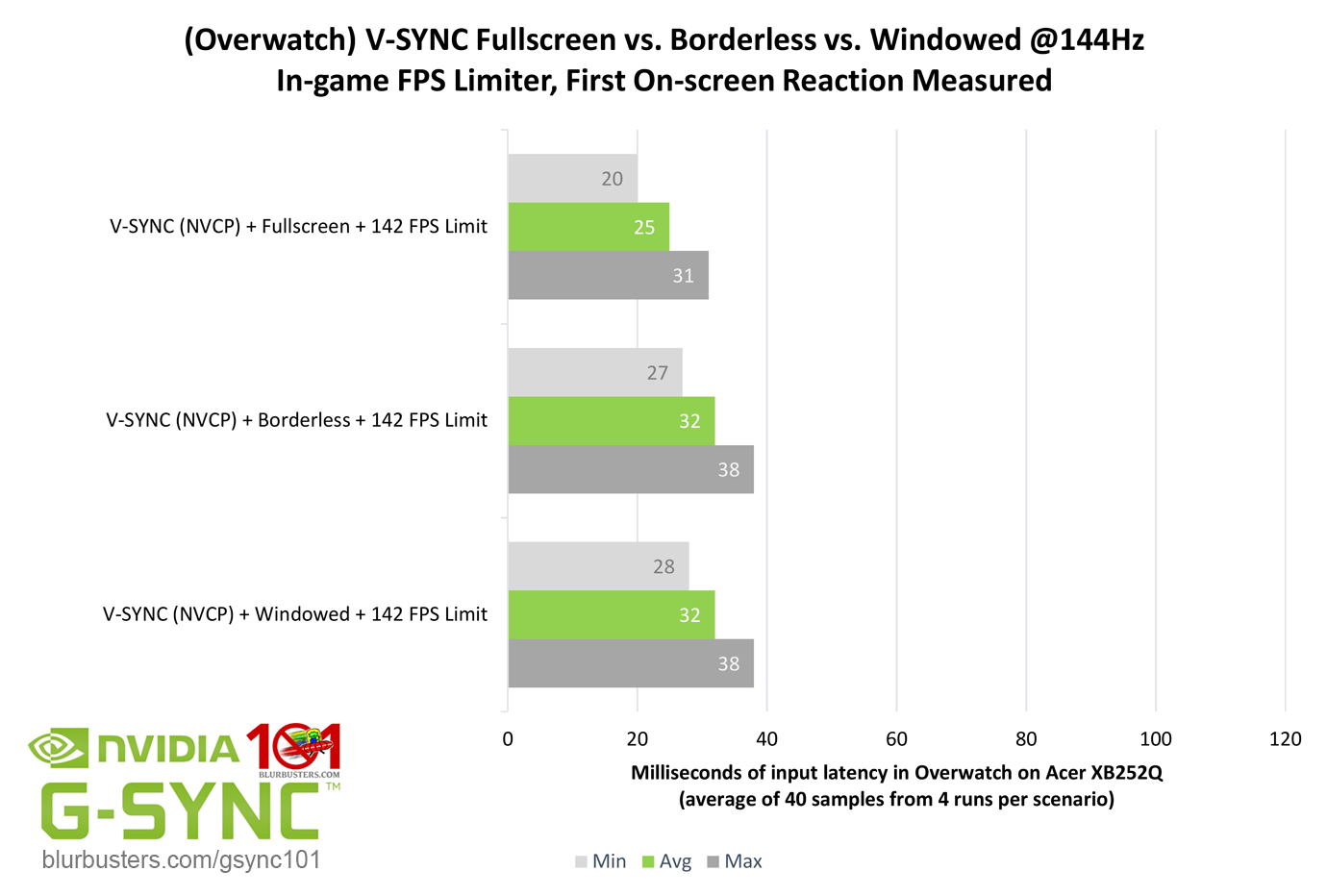
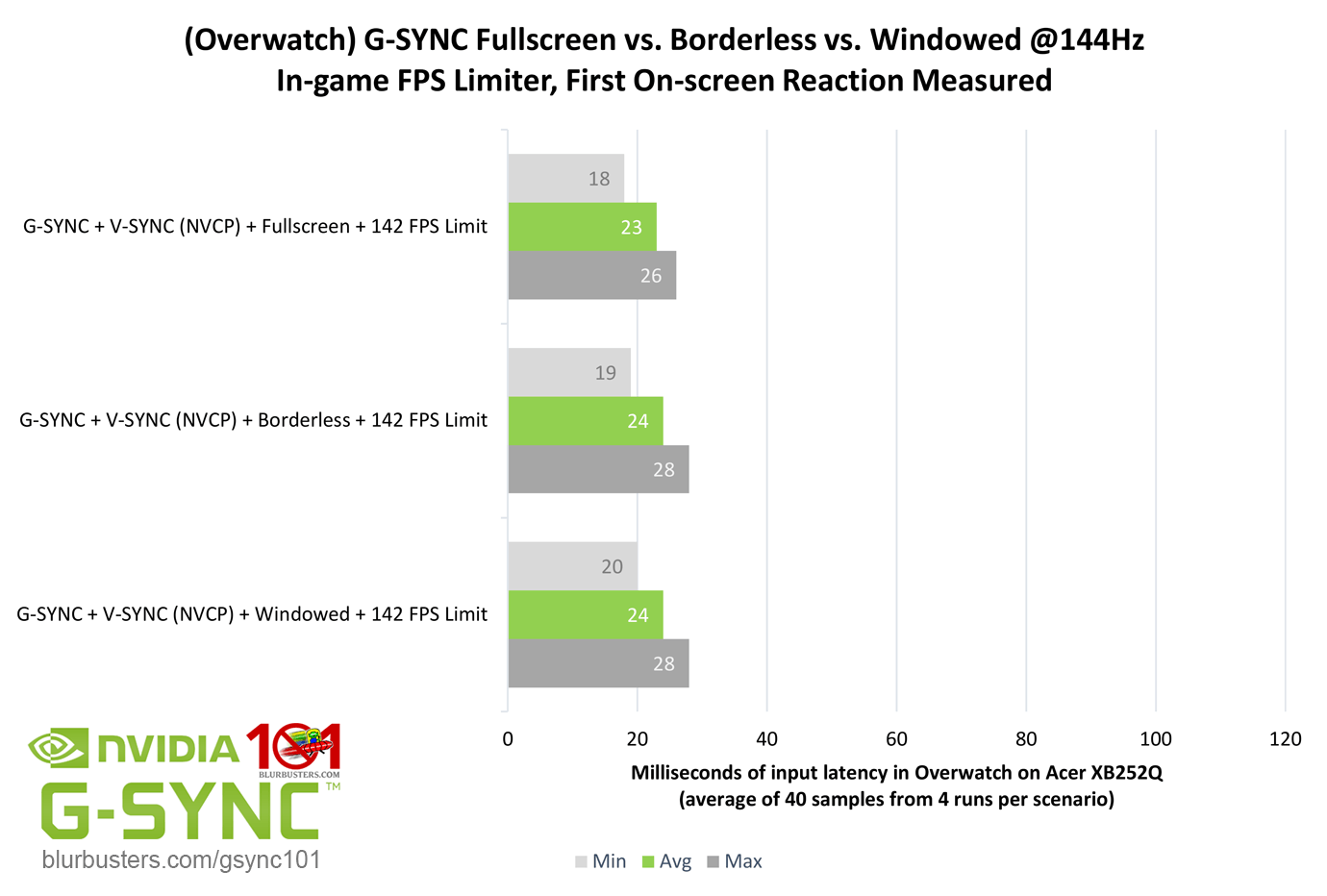
Overwatch, shows that, no, with G-SYNC enabled, both borderless and windowed mode do not add 1 frame of delay over exclusive fullscreen. Standalone “V-SYNC,” however, does show the expected 1 frame of delay.

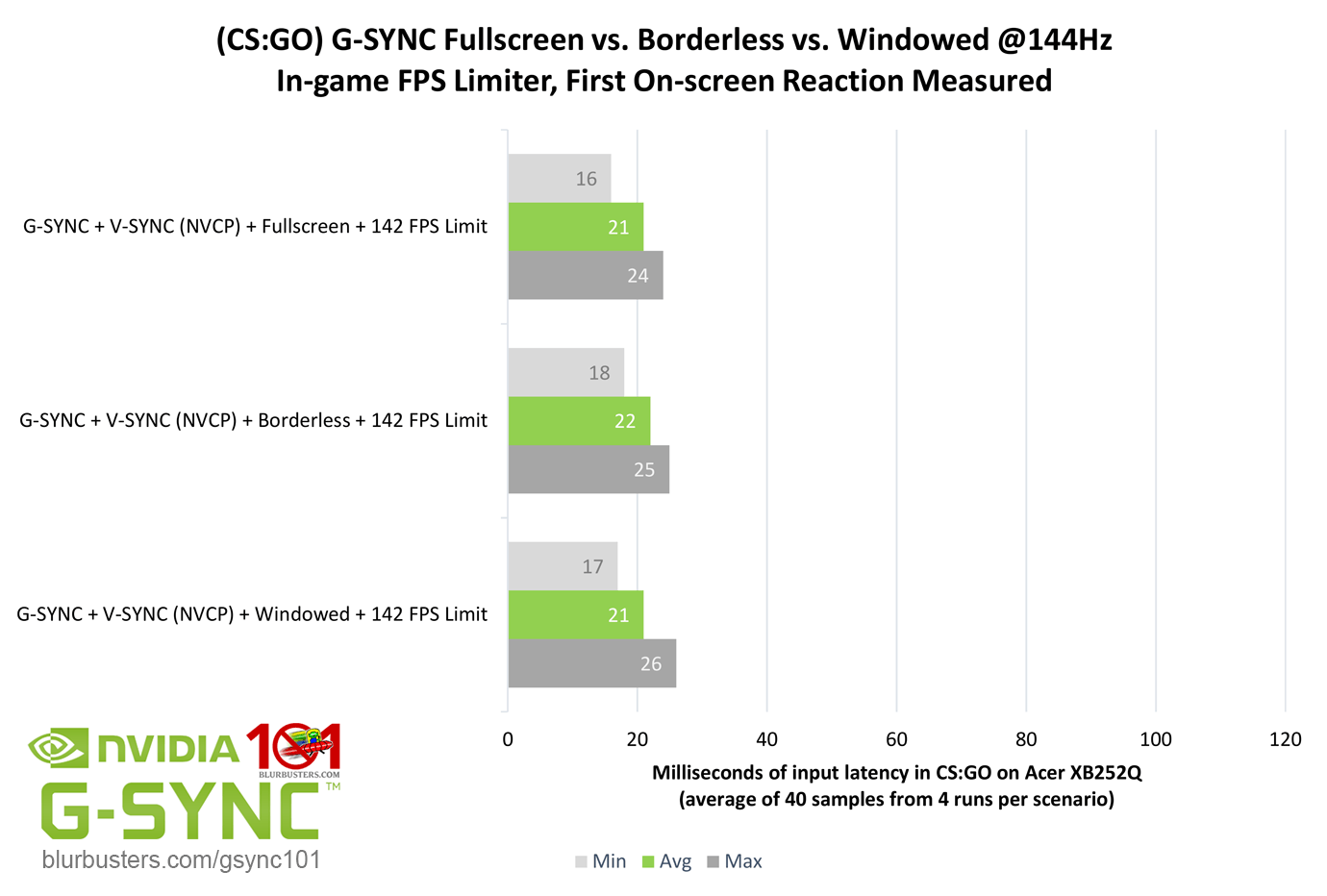
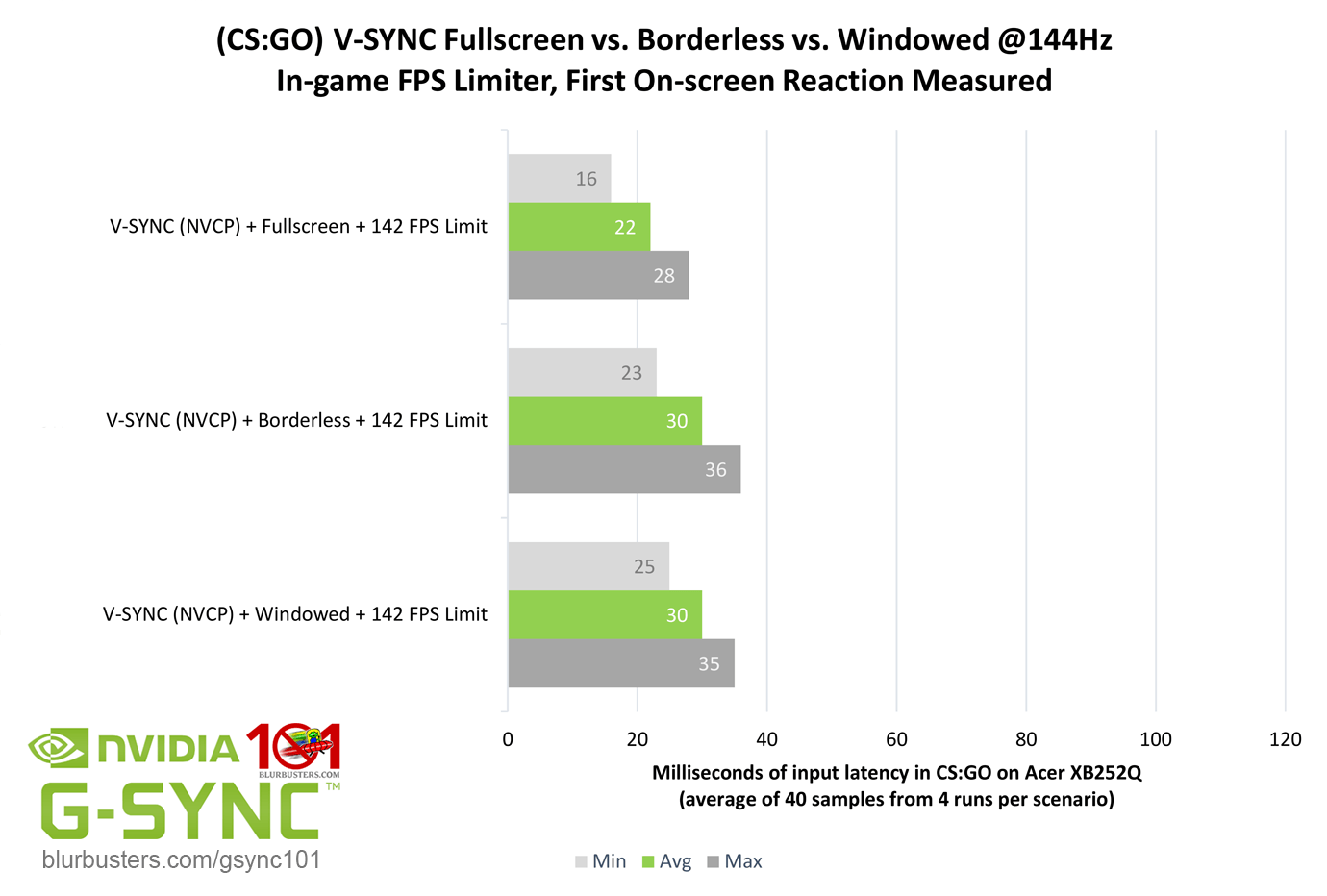
CS:GO was also tested for corroboration, and ought to have the same results, as DWM behavior is at the OS-level and should remain unchanged, regardless of the game…
Blur Buster's G-SYNC 101: Input Latency & Optimal Settings

Sure enough, again, G-SYNC sees no added delay, and V-SYNC sees the expected 1 frame of delay.

Further testing may be required, but it appears on the latest public build of Windows 10 with out-of-the-box settings (with or without “Game Mode”), G-SYNC somehow bypasses the 1 frame of delay added by the DWM. That said, I still don’t suggest borderless or windowed mode over exclusive fullscreen due to the 3-5% decrease in performance, but if these findings are true across configurations, it great news for games that only offer a borderless windowed option, or for multitaskers with secondary monitors.



3735 Comments For “G-SYNC 101”

This site uses Akismet to reduce spam. Learn how your comment data is processed.

Sort by:   newest | oldest | most liked
kdog1998
Member
kdog1998

I have a question about my monitors VRR and if you know if there’s a fix for this or if I possibly have a bad monitor?

I have on G sync as recommended by you, using a Riva Tuner fps cap of 60 for final fantasy xvi. I have a perfectly flat frame time graph per riva tuner, but my game feels extremely jittery when I move around, especially when moving the camera. I figured out that my monitors on screen display that shows what it’s refreshing at is constantly bouncing around when using g sync and adaptive sync on. It will bounce from 60 to 52 to 67 to 48 to 180 (which is my max refresh) back to 60 to 77 and etc.. so despite my game holding a locked in 60 fps with a flat frame time graph, my monitor doesn’t seem to be refreshing at 60 and it seems to be bouncing around.

Is this normal? Or did I just happen to get a bad monitor or graphics card? My monitor is the ASUS VG27AQ3A, I have had it for about 6 months and have been thinking from the beginning something may be off with it. Any help would be great!

depatere
Member
depatere

I just got the Asus XG27AQWMG which is a Gsync compatible monitor with 280hz refresh rate.
To make G-Sync pop up as a setting in NVCP, I needed to enable VRR on the monitor OSD.

However, during testing the optimal settings mentioned here, I’ve enabled Reflex + Boost on World of Warcraft, however, it does not seem to limit any fps.

Should I just use the NVCP Framelimiter on top of it for the lowest input lag?

galloflom
Member
galloflom

Thanks for this info! Quick question, I have an asus zephyrus g15 2021 (165hz) ga503qr with an rtx 3070 and ryzen 9 5900hs, and i was wondering if the optimal setup changes due to the fact that the laptop screen is using amd freesync and there’s no mux switch available in this model? Because when I try to go to the nvidia panel i dont see any option to enable or change gsync, and when i try to use the setup you recommend, the games feel choppy. Just wondering what the best way to set it up in my case would be?

hydroxido
Member
hydroxido

Hey guys, regarding Fortnite on a 360Hz display with G-Sync + NVCP V-Sync + Reflex On/Boost. The Reflex auto-cap isn’t working at all since on Unlimited the in-game counter actually exceeds the refresh rate, and if I set the in-game limiter to 360 the counter sits locked at 360. Is Reflex broken in this game or should I just force a manual 340fps cap in NVCP to ensure I stay within G-Sync range?

Alex4S
Member
Alex4S

I tried Vsync on Nvidia+Gsync on and capped at 237 It seems The frames drop top 160 or even lower at big fights in games like League of legends then frames go back to normal and that can be annoying and noticeable stuttering and not so smooth. Having vsync off it seems that doesnt happen but of course i have some tearing. Why does it happen I have the game on bordereless mode shall i activate gsync both for fullscreen and window mode?

wpDiscuz