
G-SYNC 101: G-SYNC vs. V-SYNC w/FPS Limit


So Close, Yet So Far Apart

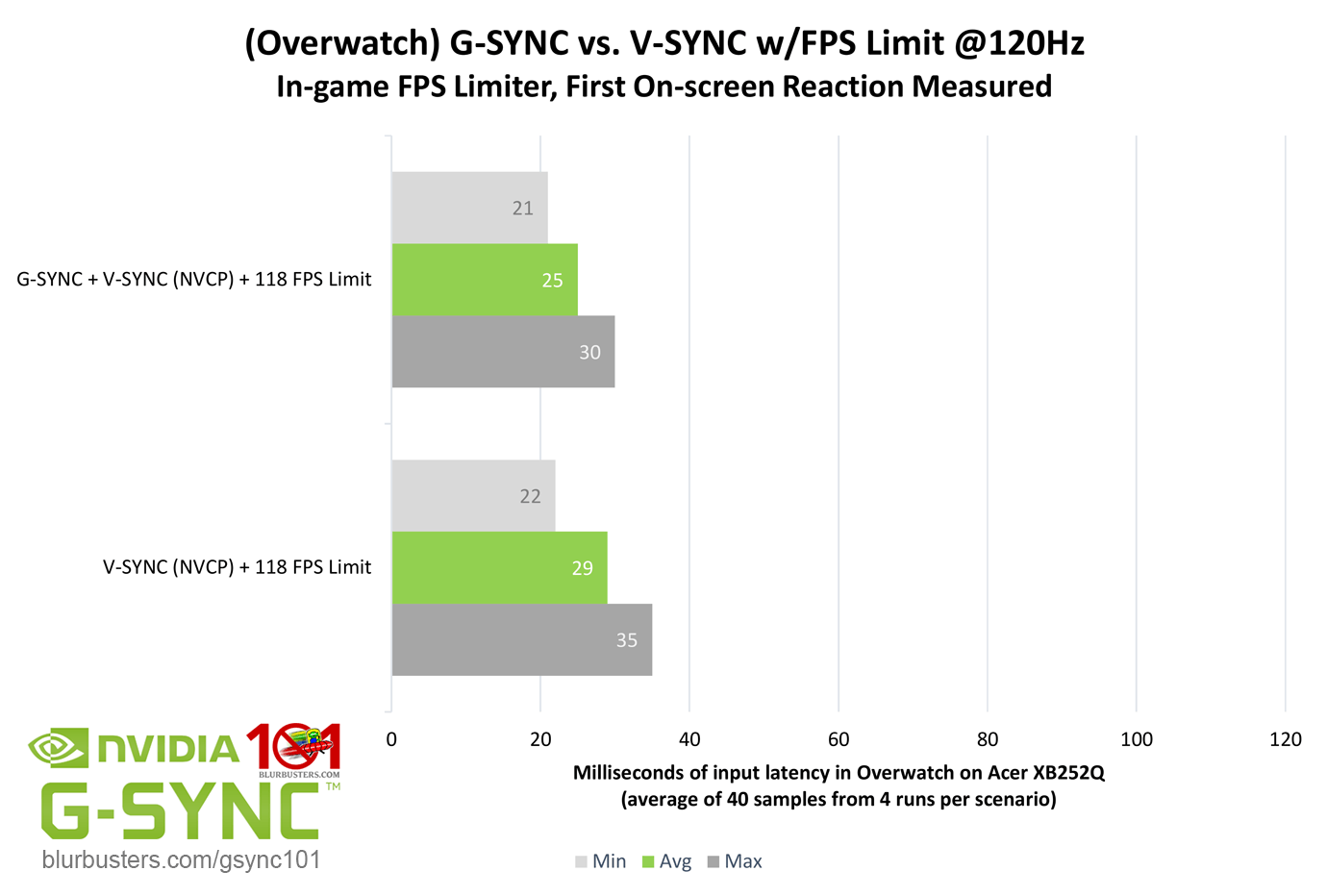
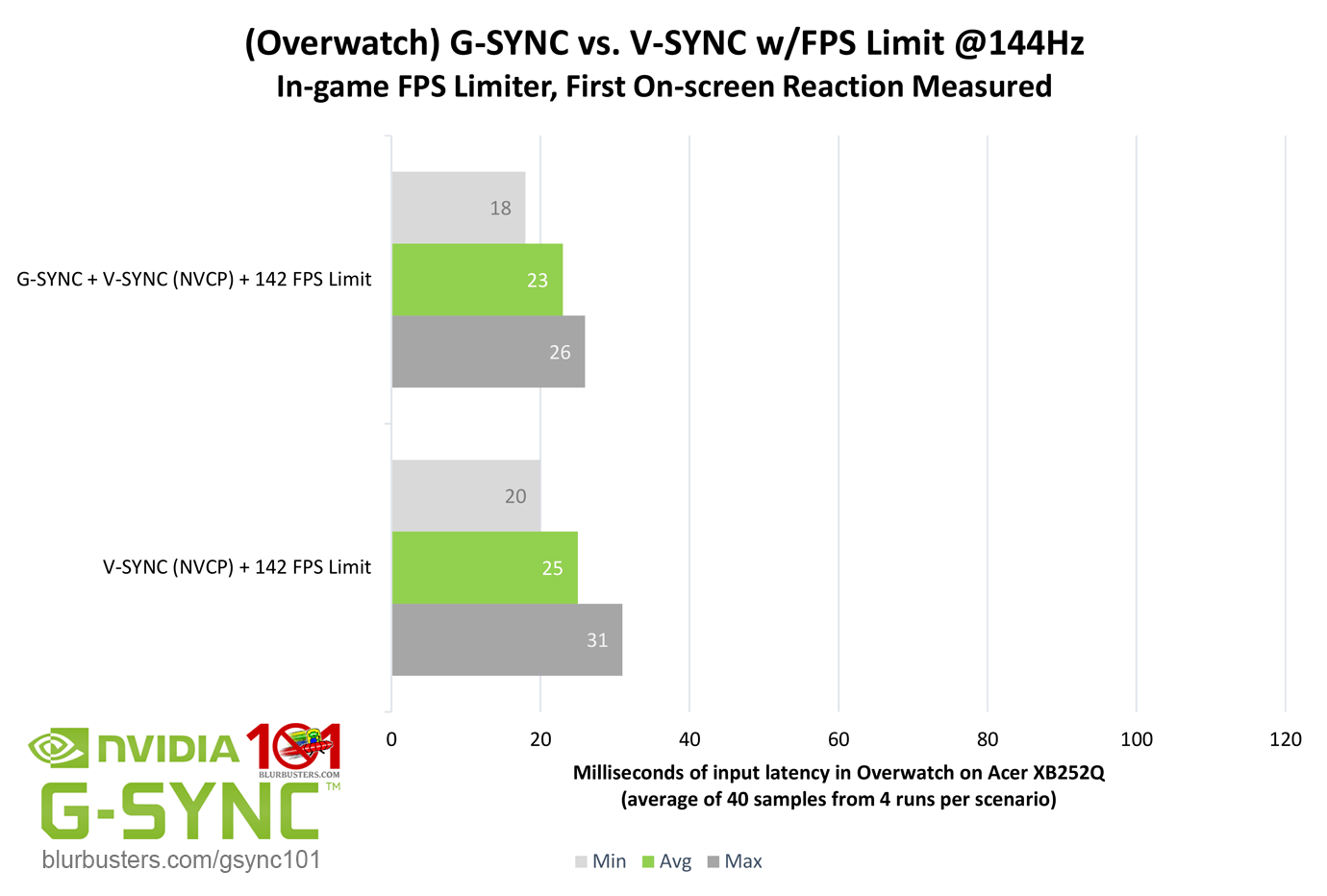
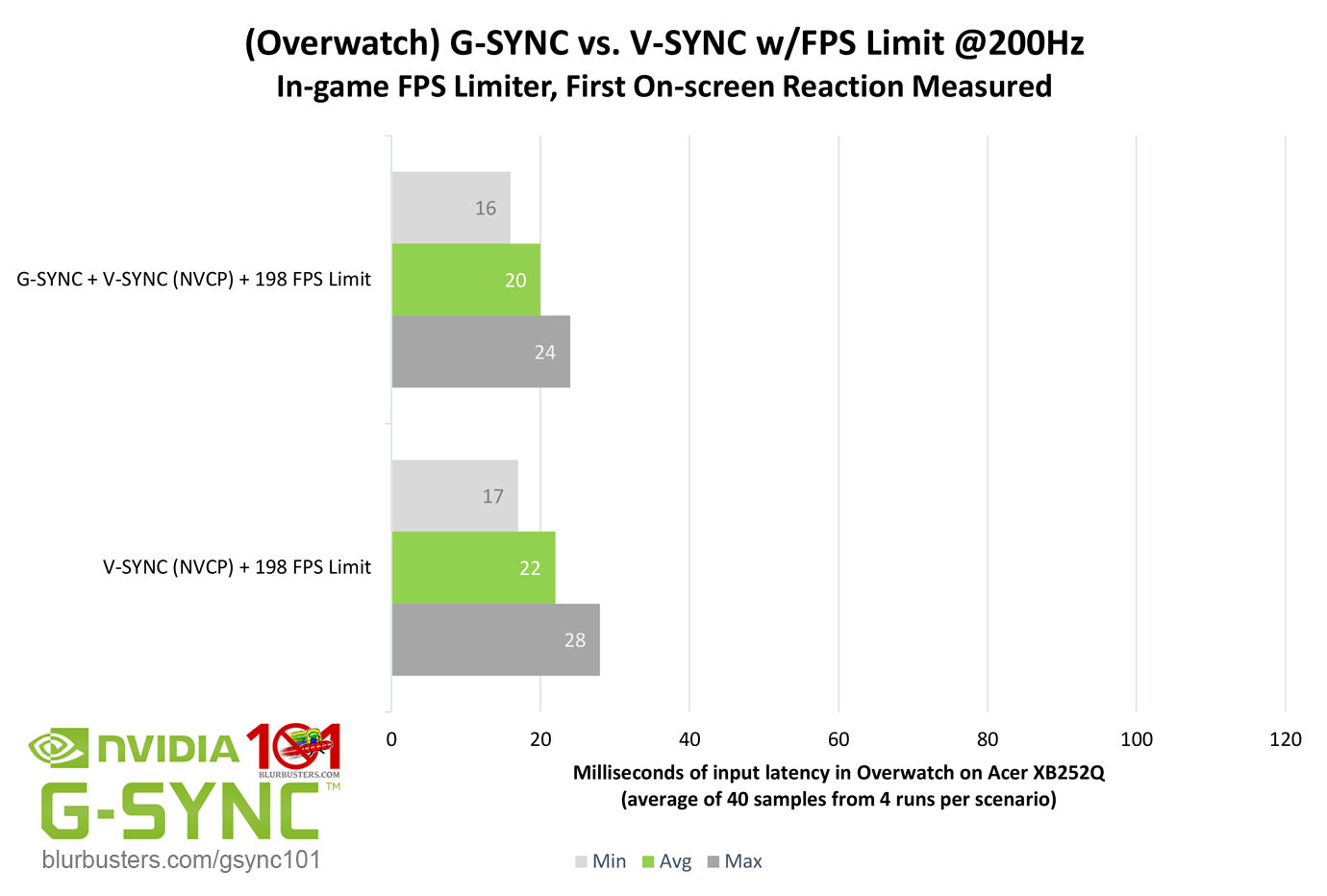
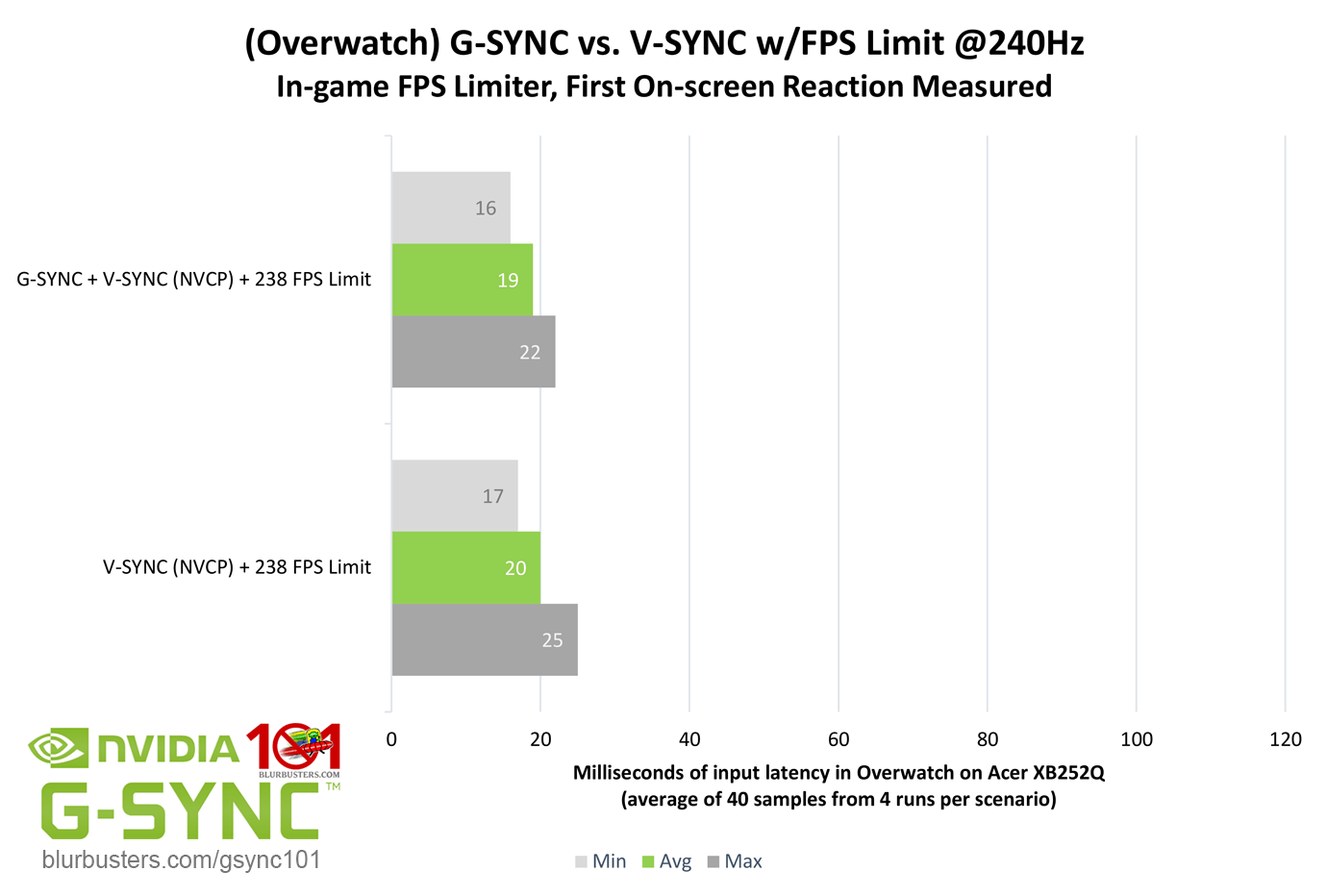
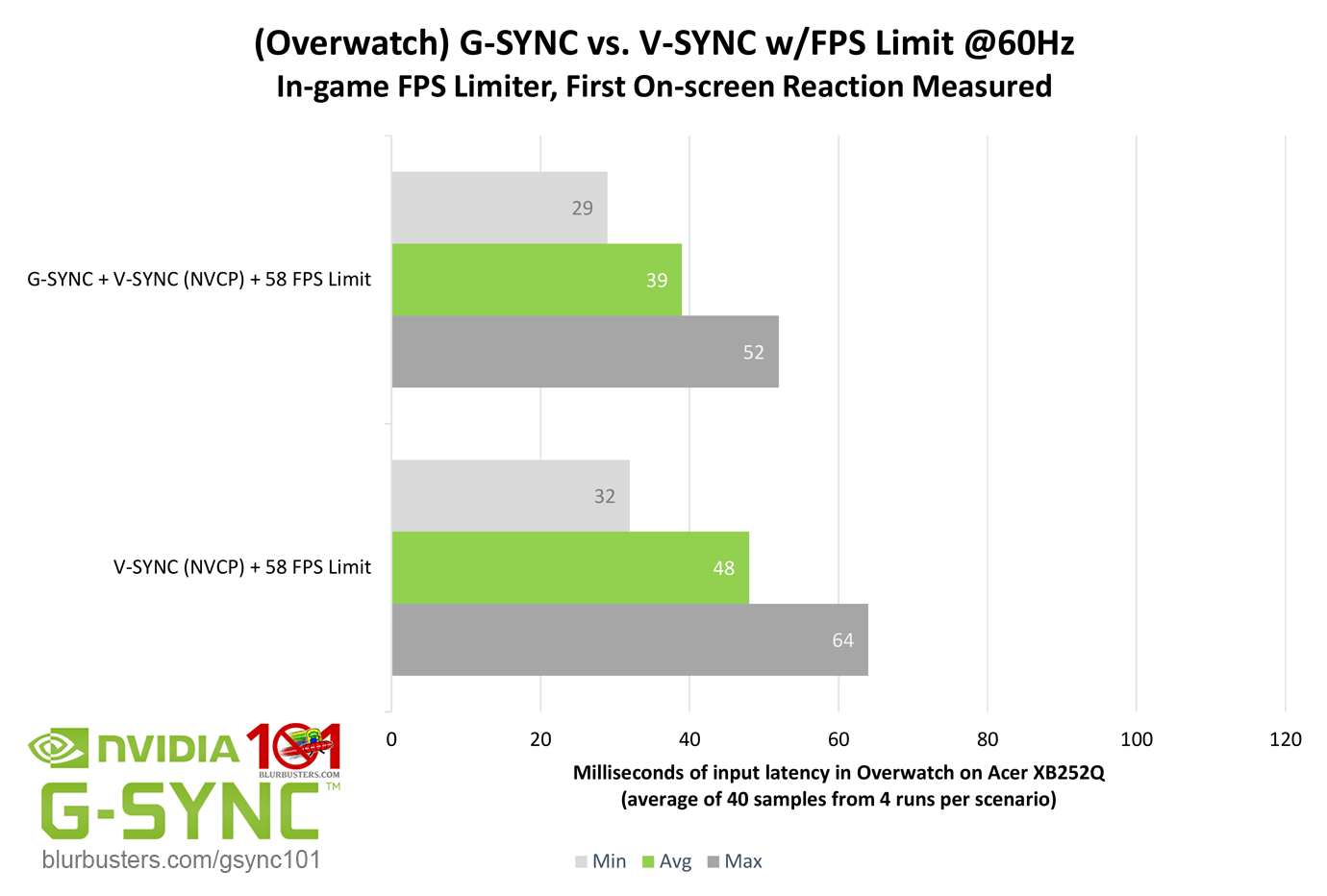
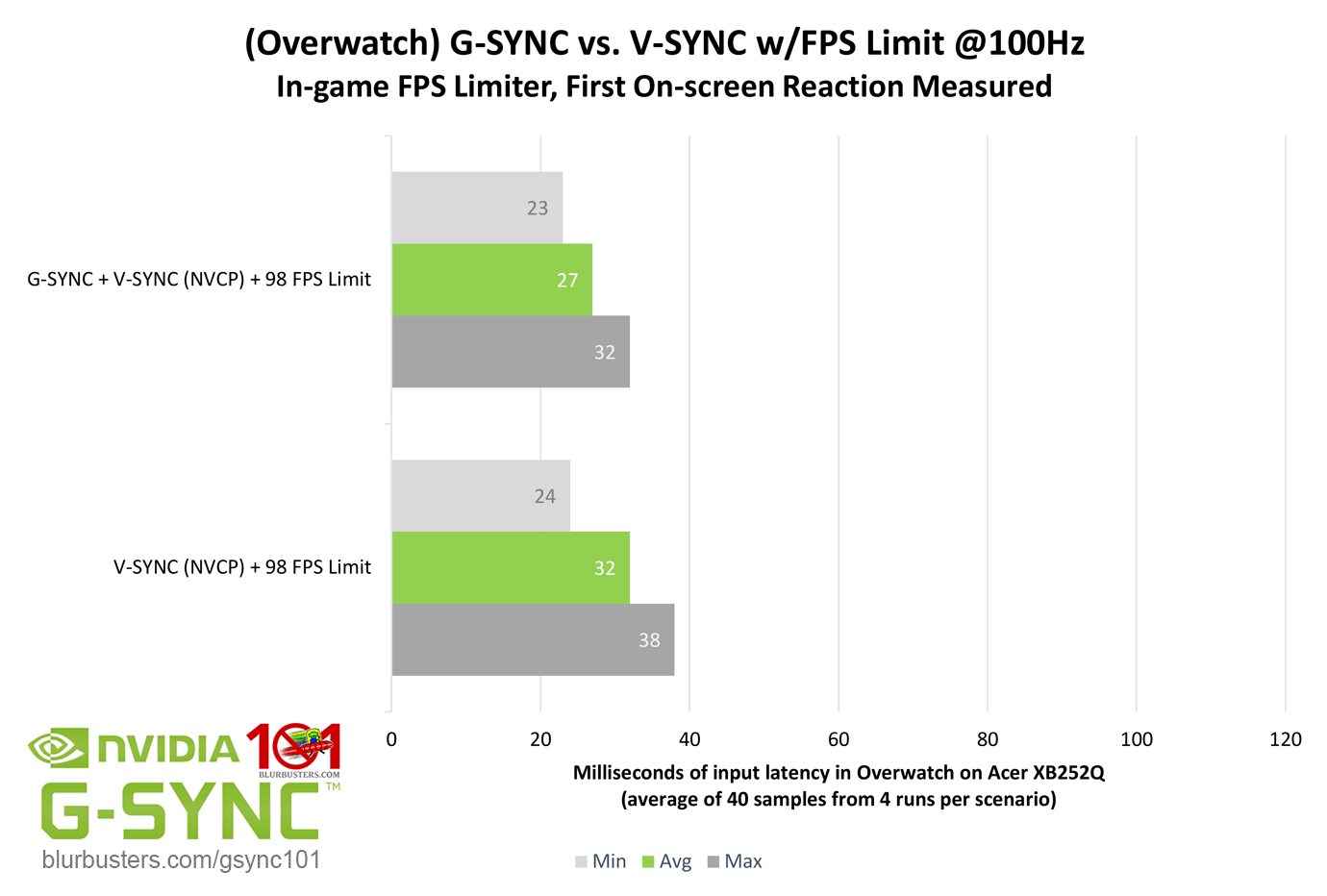
On the subject of single, tear-free frame delivery, how does standalone double buffer V-SYNC compare to G-SYNC with the same framerate limit?
Blur Buster's G-SYNC 101: Input Latency & Optimal Settings

As the results show, but for 60Hz (remember, a “frame” of delay is relative to the refresh rate), the numbers are relatively close. So what’s so great about G-SYNC’s ability to adjust the refresh rate to the framerate, if the majority of added input latency with V-SYNC can be eliminated with a simple FPS limit? Well, as the title of this section hints, it’s not quite that cut and dry…

While it’s common knowledge that limiting the FPS below the refresh rate with V-SYNC prevents the over-queuing of frames, and thus majority of added input latency, it isn’t without its downsides.

Unlike G-SYNC, V-SYNC must attempt to time frame delivery to the fixed refresh rate of the display. If it misses a single one of these delivery windows below the maximum refresh rate, the current frame must repeat once until the next frame can be displayed, locking the framerate to half the refresh rate, causing stutter. If the framerate exceeds the maximum refresh rate, the display can’t keep up with frame output, as rendered frames over-queue in both buffers, and appearance of frames is delayed yet again, which is why an FPS limit is needed to prevent this in the first place.

When an FPS limit is set with V-SYNC, the times it can deliver frames per second is shrunk. If, for instance, the FPS limiter is set to 59 fps on a 60Hz display, instead of 60 frames being delivered per second, only 59 will be delivered, which means roughly every second a frame will repeat.

As the numbers show, while G-SYNC and V-SYNC averages are close over a period of frames, evident by the maximums, it eventually adds up, causing 1/2 to 1 frame of accumulative delay, as well as recurring stutter due to repeated frames. This is why it is recommended to set a V-SYNC FPS limit mere decimals below the refresh rate via external programs such as RTSS.

That said, an FPS limit is superior to no FPS limit with double buffer V-SYNC, so long as the framerate can be sustained above the refresh rate at all times. However, G-SYNC’s ability to adjust the refresh rate to the framerate eliminates this issue entirely, and, yet again, beats V-SYNC hands down.



3734 Comments For “G-SYNC 101”

This site uses Akismet to reduce spam. Learn how your comment data is processed.

Sort by:   newest | oldest | most liked
kdog1998
Member
kdog1998

I have a question about my monitors VRR and if you know if there’s a fix for this or if I possibly have a bad monitor?

I have on G sync as recommended by you, using a Riva Tuner fps cap of 60 for final fantasy xvi. I have a perfectly flat frame time graph per riva tuner, but my game feels extremely jittery when I move around, especially when moving the camera. I figured out that my monitors on screen display that shows what it’s refreshing at is constantly bouncing around when using g sync and adaptive sync on. It will bounce from 60 to 52 to 67 to 48 to 180 (which is my max refresh) back to 60 to 77 and etc.. so despite my game holding a locked in 60 fps with a flat frame time graph, my monitor doesn’t seem to be refreshing at 60 and it seems to be bouncing around.

Is this normal? Or did I just happen to get a bad monitor or graphics card? My monitor is the ASUS VG27AQ3A, I have had it for about 6 months and have been thinking from the beginning something may be off with it. Any help would be great!

depatere
Member
depatere

I just got the Asus XG27AQWMG which is a Gsync compatible monitor with 280hz refresh rate.
To make G-Sync pop up as a setting in NVCP, I needed to enable VRR on the monitor OSD.

However, during testing the optimal settings mentioned here, I’ve enabled Reflex + Boost on World of Warcraft, however, it does not seem to limit any fps.

Should I just use the NVCP Framelimiter on top of it for the lowest input lag?

galloflom
Member
galloflom

Thanks for this info! Quick question, I have an asus zephyrus g15 2021 (165hz) ga503qr with an rtx 3070 and ryzen 9 5900hs, and i was wondering if the optimal setup changes due to the fact that the laptop screen is using amd freesync and there’s no mux switch available in this model? Because when I try to go to the nvidia panel i dont see any option to enable or change gsync, and when i try to use the setup you recommend, the games feel choppy. Just wondering what the best way to set it up in my case would be?

hydroxido
Member
hydroxido

Hey guys, regarding Fortnite on a 360Hz display with G-Sync + NVCP V-Sync + Reflex On/Boost. The Reflex auto-cap isn’t working at all since on Unlimited the in-game counter actually exceeds the refresh rate, and if I set the in-game limiter to 360 the counter sits locked at 360. Is Reflex broken in this game or should I just force a manual 340fps cap in NVCP to ensure I stay within G-Sync range?

Alex4S
Member
Alex4S

I tried Vsync on Nvidia+Gsync on and capped at 237 It seems The frames drop top 160 or even lower at big fights in games like League of legends then frames go back to normal and that can be annoying and noticeable stuttering and not so smooth. Having vsync off it seems that doesnt happen but of course i have some tearing. Why does it happen I have the game on bordereless mode shall i activate gsync both for fullscreen and window mode?

wpDiscuz